Auto repair shop software · 7-day free trial
RO Ready in 2 minutes
Built for shops still running on paper and spreadsheetsScan the VIN, add parts and labor, send the PDF. No demo call. No credit card.
“In my 8 years in the automotive industry, Garage is one of the easiest shop management systems I’ve ever used.”
“It keeps our repair orders, customers, and services much more organized.”
7 days free, no credit card, cancel anytime
Questions? Text us at (212) 470-2216 — a real person, not a sales call.
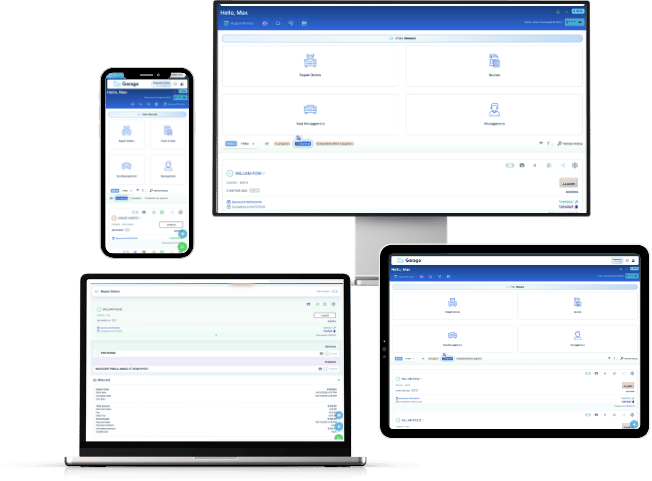
How it works
From the VIN to the PDF, in three steps
Nothing to install and no setup weekend. Open it and write the first repair order — and if you get stuck, the video tutorials sit right inside the screen you’re on.
Scan the VIN
Point the camera at the VIN and the vehicle fills itself in — make, model and year.
VIN Scanner is on Premium, and the free trial includes it.Add parts and labor
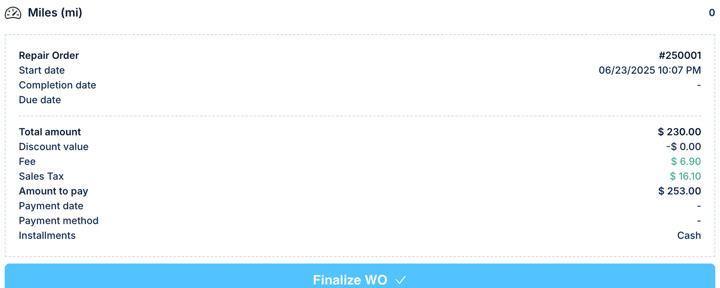
Quantities, prices, shop fees and sales tax add themselves up as you type.
Send the PDF
One tap and the repair order goes out as a PDF with your shop's logo. Email, text or print it.
The part nobody says out loud
Most shop software won’t let you start without a call
You fill in a form. You wait for a callback. You sit through a screen share. Then you get to see whether it fits the way your shop actually works.
We'd rather you just open it and write a repair order. If it doesn't fit, you close the tab — and we never got your credit card in the first place.
Start free · 7 days →Garage
Most shop software
Why shops switch
Built for the bay, not the boardroom
The shops that move over aren't leaving another system. They're leaving a clipboard and a spreadsheet. Cars, motorcycles, trucks, vans — whatever rolls into your bays.
Every vehicle has a file
Pull up everything you've ever done to a vehicle, by VIN, in seconds. No filing cabinet.
Fees and sales tax, handled
Shop supply, hazmat and sales tax as their own lines — on the estimate and on the invoice.
Approval on record
Capture the customer's signature and keep it attached to the repair order.
Photos where they belong
Attach photos to the RO and send them with the PDF — proof the customer can actually see.
Nothing to install
Runs in the browser on the phone at the lift and the computer at the counter. There are iPhone and Android apps too, if you want them.
Start free, no sales call
Seven days with full Premium access. No credit card, and nobody calls you to unlock it.
On your phone
Garage Pro for iPhone and Android
Open a repair order at the car, scan the VIN, add parts and labor as the job moves, and send the estimate before the work starts. Same shop, same data as the browser, in your pocket.
Create your account here first, then sign in on the app with the same email. You don’t need the app to start — everything runs in the browser too.

 Scan with your camera

 Scan with your camera
From shops and pros using it
Not a case study. Just what they said.
Trusted by repair shops across North America and Europe
Garage has been a great tool for our daily work. It’s easy to use and keeps our repair orders, customers, and services much more organized. What I like most is how practical it is to create repair orders and send them to customers. The support team is excellent, very responsive, and always willing to help. Highly recommended!
I run a motorcycle and bicycle shop in Coimbra, Portugal, and decided to give Garage a try. It’s easy to use, and the team is incredibly responsive. They quickly adjust the smallest details to fit exactly what we need. Highly recommended.
An independent review
GarageAuto is exceptionally easy to use, incredibly fast to learn, and packs massive value into a streamlined CRM. Running through complex workflows on both mobile and desktop proved remarkably smooth. Highly recommended for any shop looking to optimize operations.
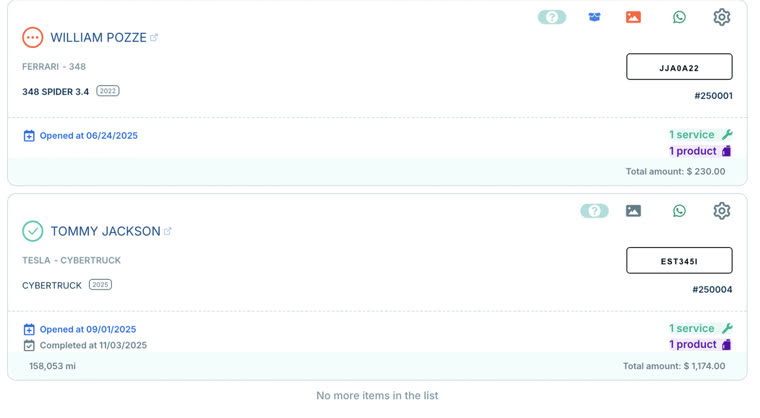
Inside the app
This is what you actually get
Pricing
After the 7 free days, from $29/month
No contracts. Cancel anytime. Outside the U.S., contact us for local currency.
In every plan
From day one, on both plans:
- Unlimited customers
- Unlimited parts and services
- Unlimited vehicles
- Sales tax and fees
- Your shop logo on every RO
- Customer updates by email, iMessage and WhatsApp
Essential
$39$29/month
Limited-time offer · Get $29/month through Nov. 23
Billed monthly · Cancel anytime
- 1 user
- Up to 100 repair orders per month
- Estimate control
- Basic analytics and charts
- 6 GB photo storage
- Email support
Premium
$99$69/month
Limited-time offer · Get $69/month through Nov. 23
Billed monthly · Cancel anytime
Everything in Essential, plus:
- Up to 7 users, with role-based permissions
- Unlimited repair orders
- VIN Scanner
- Point of Sale (POS)
- Shop scheduling
- Vehicle checklist
- Inventory
- Employee commissions
- Time tracking (clock in / clock out)
- Technical reports with photos, shareable as PDF
- Cost and profit analytics
- Secure data backup
- 16 GB photo storage
- Live chat and email support
Questions
Before you start
Do I have to talk to a salesperson?
No. You create the account and start writing repair orders — there is no demo to book and no call to sit through. Support is there if you want it, but nothing is gated behind it.
Does Garage handle US sales tax and shop fees?
Yes. Set your sales tax rate and shop fee once and Garage applies them to every repair order and invoice. Mark any part or service as non-taxable, add an extra fee to a single RO, and rename the labels to match your shop. A repair shop in South Florida already runs on it.
Does Garage work with QuickBooks?
A direct QuickBooks integration is in development and coming soon. For now you can export your sales, tax and commission reports as a CSV and import them into QuickBooks — or send them straight to your accountant.
Can my customer open the repair order I send them?
Yes. It goes out as a PDF by WhatsApp, iMessage or email, and it opens right on their phone — nothing for them to install and no account to create. Sending is unlimited and costs nothing extra.
What happens after the 7 days?
Nothing is charged automatically — you never enter a card to start the trial. On day eight the system only continues if you choose a plan and pay.
Does the free trial include the Premium features?
Yes. The trial runs on Premium, so the VIN Scanner, scheduling, inventory, POS and the rest are all available while you test.
Do I have to enter all my customers before I can start?
No. Start with the next vehicle that rolls into the bay — the customer list builds itself as cars go through. If you already have a list somewhere, importing is possible: talk to the team and we’ll handle it.
Is there a limit on repair orders?
On Essential, up to 100 repair orders a month. On Premium, unlimited. Customers, vehicles, parts and services are unlimited on both plans.
Does it work on my phone?
Yes. It runs in the browser on your phone, your tablet and the computer at the front counter — the same account, the same repair orders. There is nothing to install to get started, and there is a Garage Pro app for iPhone and iPad if you’d rather have one.
Do I have to sign a contract?
No. Garage is month to month. Cancel anytime, no contracts and no cancellation fee.
Your next repair order could be done in two minutes.
No credit card. No demo call. Just open it and write one.
Start free · 7 days → 7 days free · No credit card · Cancel anytime